|
DENIAL REPORTING Denial Reporting provides the ability to view which claims that have been marked "Deny" in the A/R > Payment/Transfers menu via the Detail tab due to an insurance claim denial. In addition to manually entered denial information, claim adjustment reason codes for Line-item zero dollar payments posted posted electronically will be included on this report if the the charges were billed with Line Item Control Numbers (REF*6R segments).
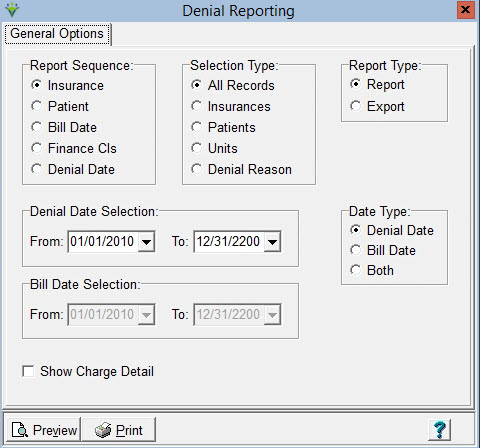
Report Sequence: Set to print the report by Insurance, Patient, Bill Date, Financial Class, or Denial Date Selection Type: Select to print report for All Records, or for specific Insurances/Patients/Units/Denial Reason. The Denial Reason option will include denials posted both manually and electronically. For denials posted via Electronic Payments, the Denial Reason Code selected must exactly match the code from the remittance file (example 'PR1' and not '1'). Report
Type: Select Report or Export (creates an XLS file). The most
recent DCN for the Payment record with the denial will pull to the
Export file but will not display on the Report. Denial Date Selection: Select Date Range (based on the Date Type selected) Date Type: Select to use either the Denial Date, Bill Date, or both as Date Selection criteria for the report Show Charge Detail: Check to display visit detail information on the Denial Report. Select Reason Code: This option is enabled when the 'Denial Reason' Selection Type is not selected. This option allows the user to select a specific Denial Code posted via Electronic Payments even if the Denial Reason is not present in the Denial Reason Category table. The user can select from a drop-down list of pre-populated codes, or the user can enter a code not present in the drop-down list if needed. This option does not include denials posted manually via Payment Entry.
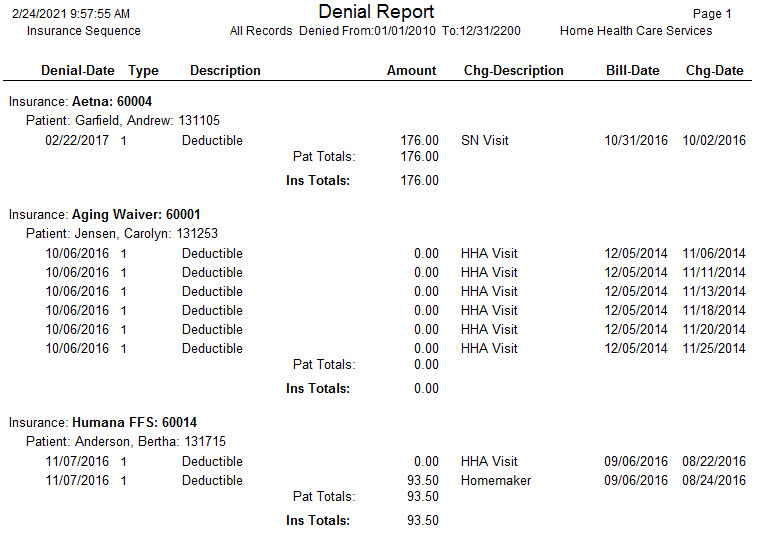
Sample Report:
|