|
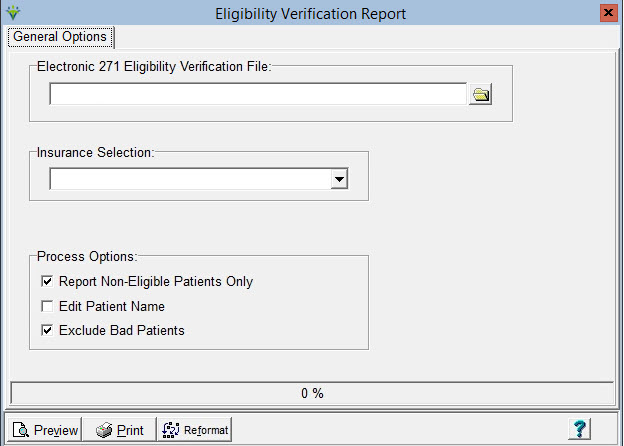
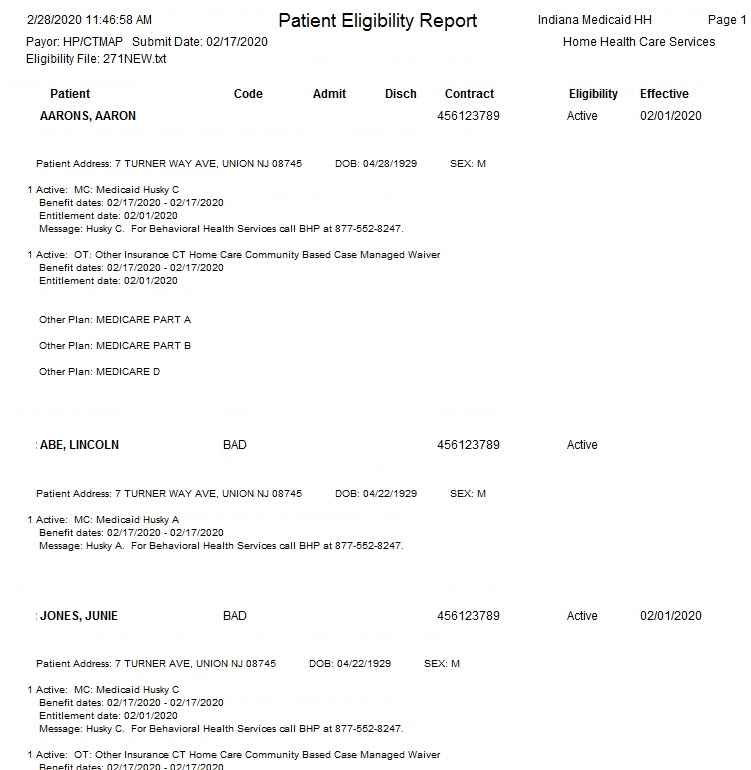
Eligibility Verification Eligibility Verification provides a way to view 271 Eligibility Verification File information.
Sample Report:
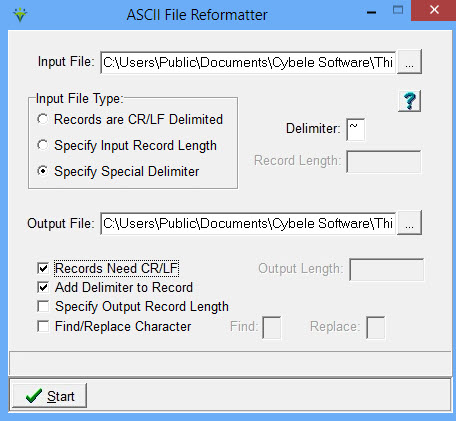
The Reformat button provides a means of adding a Carriage Return/Line Feed to a claim or response file for easier file viewing. Can also be used for improperly formatted 835 electronic remittance files prior to posting.
Input File: Specify the path where the file resides or click the ellipsis button to browse to the file location. Input File Type: Select “Specify Special Delimiter” Delimiter: Enter the character used as a delimiter in the Input File. The most common delimiter is a tilde (~). Output File: Specify the location and filename for the reformatted file (Note: the output filename and location cannot be the same as the input filename and location. Change the output file to a different name if needed). Records Need CR/LF: Select this option to add a Carriage Return/Line Feed. Add
Delimiter to Record: Select this option if CR/LF is used as the file
delimiter to remove extra CR/LF from a remittance file prior to
electronic remittance posting (i.e. for payers whose files are
formatted this way, such as HMSA). |